Quick Answer
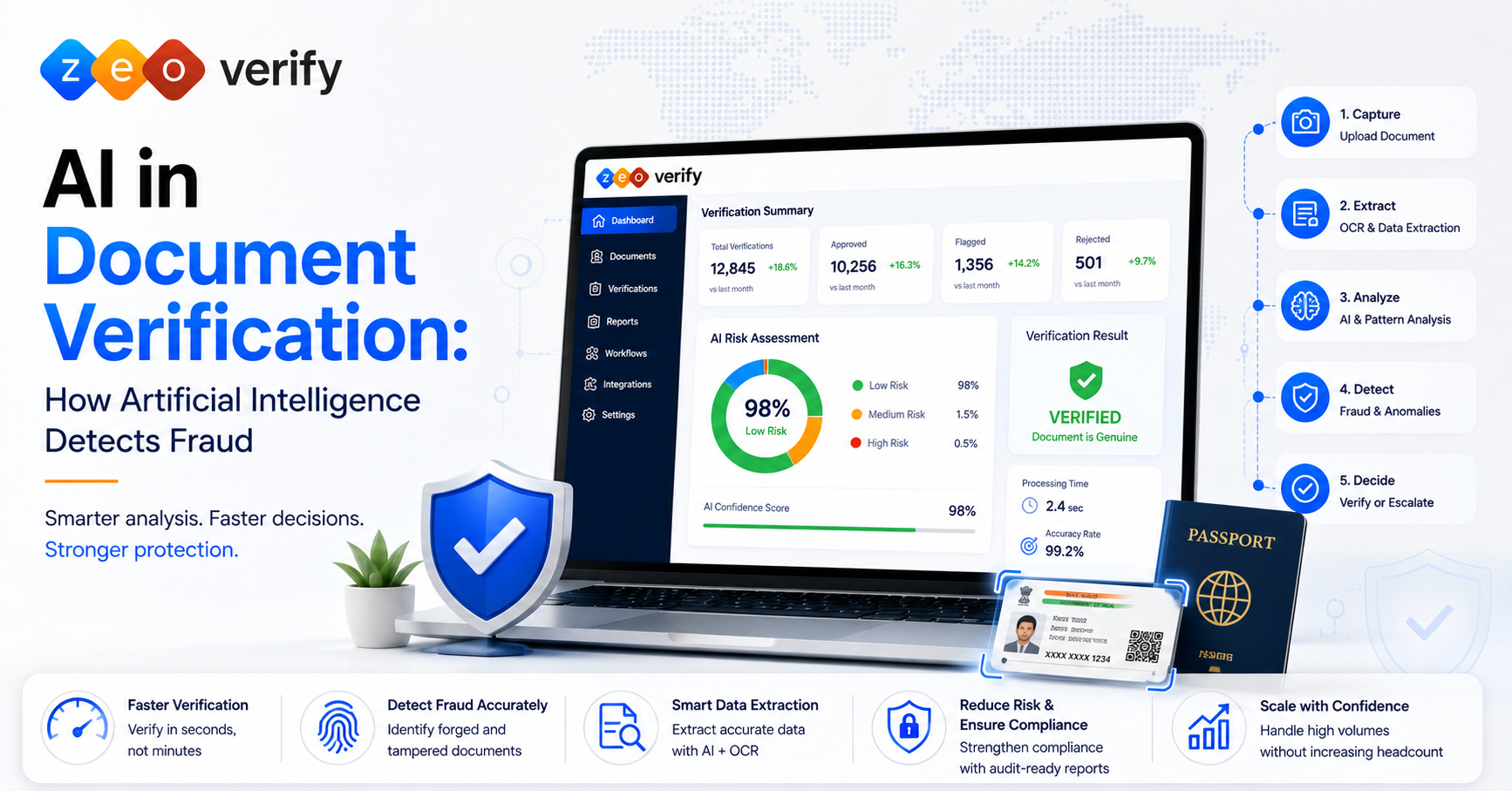
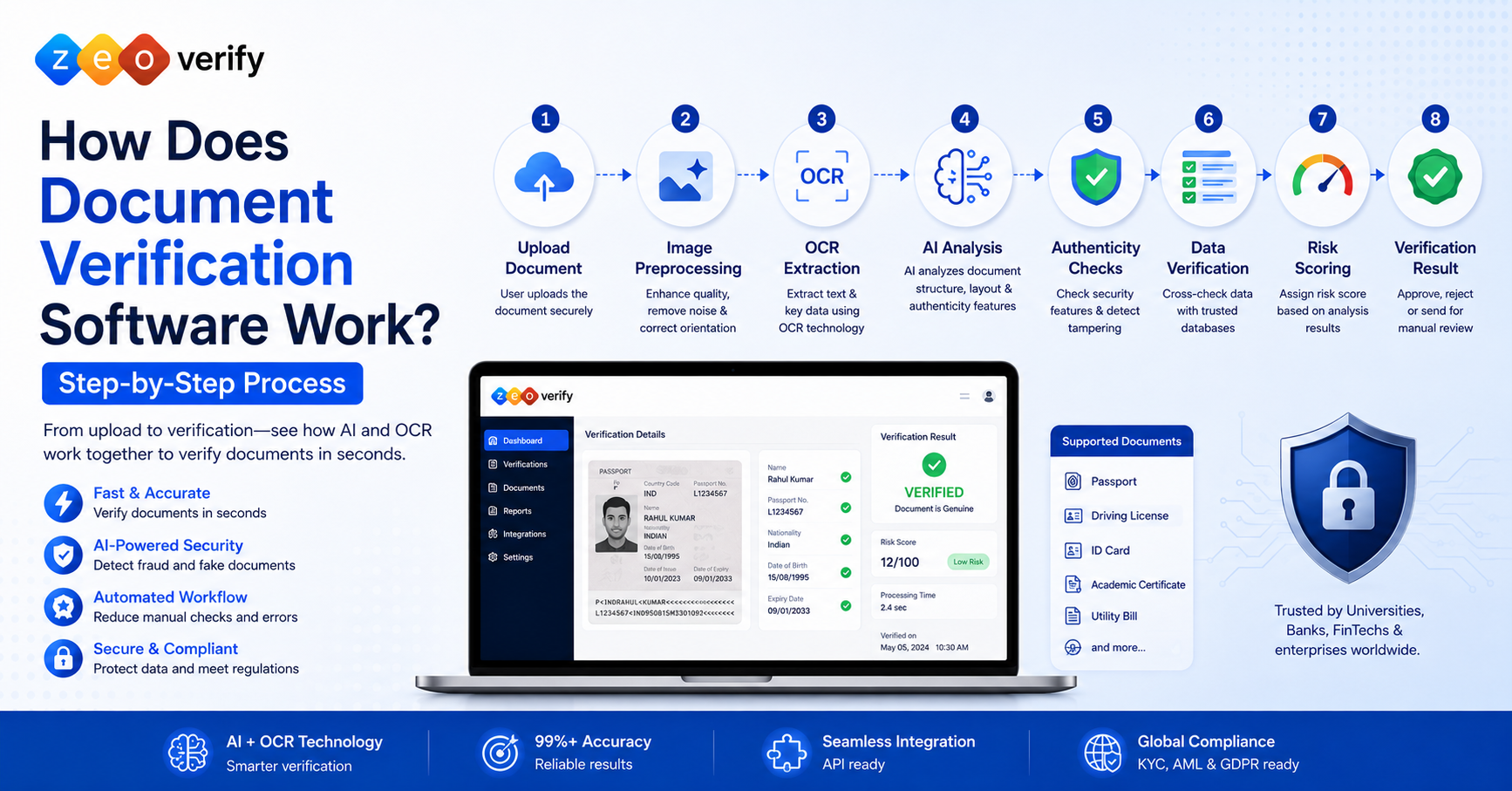
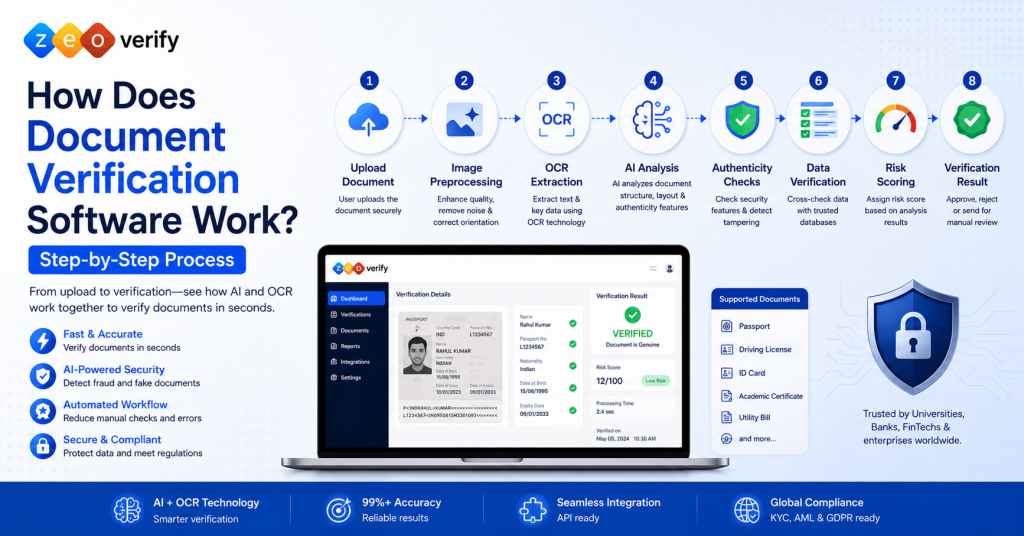
The document verification process typically involves uploading a document, enhancing the image, extracting text through OCR, analyzing the document with AI, checking for signs of tampering, cross-checking extracted data, scoring the result for risk, and returning a final decision. The entire process usually takes just seconds per document.
Introduction
Most people assume document verification happens by magic once they hit upload. In reality it is a structured pipeline with several distinct steps, each one designed to catch a different kind of problem, from a blurry photo to a cleverly forged certificate.
Modern document verification software combines OCR, AI, authenticity checks and risk analysis to verify documents within minutes while reducing manual effort and improving consistency. At ZeoVerify we build exactly this kind of pipeline for universities, banks and consultancies that cannot afford to check every document by hand. This guide walks through how document verification works from the moment a file is uploaded to the moment a decision is made.
TL;DR
- Document verification follows a structured pipeline: upload, preprocessing, OCR, AI analysis, authenticity checks, data verification, risk scoring and a final decision
- OCR extracts text while AI analyzes structure and detects signs of tampering
- Most documents get approved or rejected automatically, with only uncertain cases going to manual review
- The same pipeline works across passports, transcripts, ID cards and other common document types
- Image quality and complete data upfront lead to faster, more accurate verification
What Is the Document Verification Process?
The document verification process is the sequence of steps software uses to confirm that a submitted document is genuine, unaltered and consistent with the information provided by the person submitting it.
Why Verification Matters
Without a reliable process, fraudulent or altered documents can slip through unnoticed, creating compliance risk and undermining trust in the entire onboarding system.
Manual vs Digital Verification
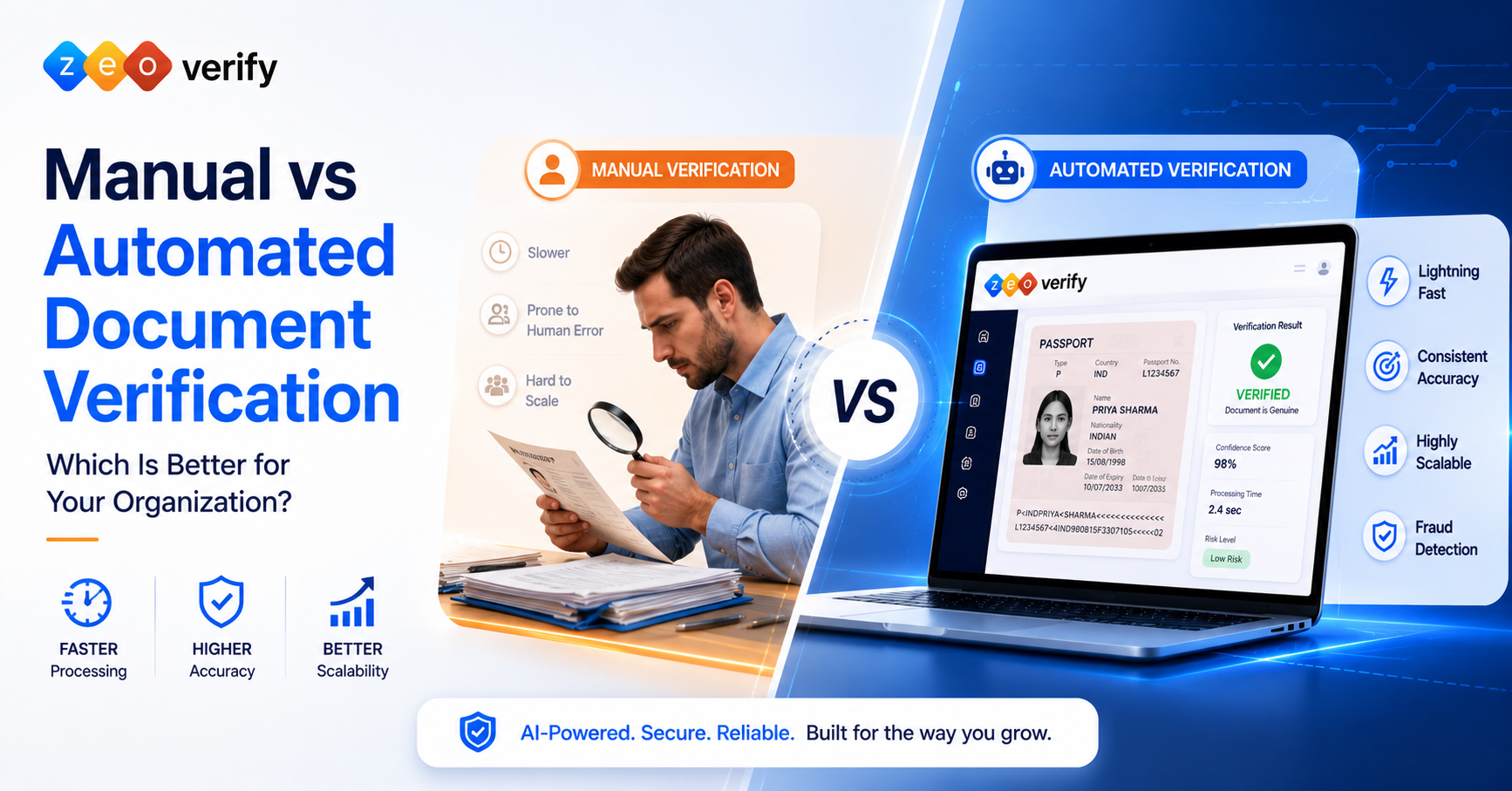
Manual verification depends on a person visually inspecting a document, which is slow and inconsistent. Online document verification runs the same checks through software, delivering faster and more repeatable results.
Why Organizations Need Automated Document Verification
Automation solves problems that manual review simply cannot keep up with at scale.
- Faster processing that takes seconds instead of minutes per document
- Improved accuracy through consistent, repeatable checks rather than a human’s judgment call
- Reduced fraud risk thanks to pattern based detection that catches subtle forgery signs
- Better user experience with instant feedback instead of long waiting periods
- Scalability that supports growing volume without adding staff proportionally
Manual Verification vs Automated Verification
| Aspect | Manual Verification | Automated Verification |
|---|---|---|
| Speed | Minutes per document | Seconds per document |
| Consistency | Depends on the reviewer | Same standard applied every time |
| Fraud detection | Limited to visible cues | Pattern and data based analysis |
| Scalability | Requires more staff to grow | Scales without proportional cost |
| When still needed | Every case | Low confidence or exceptional cases |
Automated systems still route unusual or low confidence cases to a human reviewer, so manual review does not disappear entirely, it just becomes the exception rather than the rule.
High Level Overview of the Document Verification Workflow
Before diving into each step, here is the shape of the full journey: input, processing, analysis, verification and decision. A document comes in, gets cleaned up and read, gets analyzed for authenticity and consistency, gets checked against expected data, and finally receives a verdict.
Step 1: Document Upload
Everything starts when a user submits a document through a web form, mobile app or API integration.
1. Accepted Document Types: Most platforms accept common formats like JPEG, PNG and PDF, covering everything from passports to academic transcripts.
2. Image Quality Checks: The system checks resolution and clarity immediately, flagging anything too blurry or poorly lit before it wastes time further down the pipeline.
3. File Validation: Basic checks confirm the file is not corrupted, is the expected size and matches an accepted format before processing continues.
Step 2: Image Preprocessing
Raw uploads are rarely perfect, so the software cleans them up before analysis begins.
- Image enhancement improves contrast and sharpness for better readability
- Rotation correction straightens documents photographed at an angle
- Noise reduction removes shadows, glare and background clutter
- Quality assessment gives the image a final check before moving to the next stage
Step 3: OCR (Optical Character Recognition)
OCR document verification is where the software actually reads the document.
1. Text Extraction: OCR scans the image and identifies characters, converting printed or handwritten text into digital text the system can work with.
2. Structured Data Capture: Key fields like name, date of birth and document number are pulled out and organized into a structured format rather than a raw wall of text.
3. Machine Readable Conversion: The end result is a clean, structured dataset that later steps in the pipeline can analyze and cross-check automatically.
Step 4: AI Based Document Analysis
Once the text is extracted, AI document verification takes over to understand the document as a whole.
- Document classification identifies what type of document this actually is, such as a passport or a transcript
- Template recognition compares the layout against known genuine formats for that document type
- Layout analysis checks that fields, fonts and spacing match expected patterns
- Data validation confirms the extracted information is logically consistent, such as a valid date format
Step 5: Authenticity Checks
This stage focuses specifically on catching tampering and fake documents.
| Check | What It Looks For |
|---|---|
| Security feature detection | Holograms, microprint and other built in security elements |
| Watermark detection | Confirms official watermarks are present and correctly placed |
| Tampering detection | Signs of digital editing or physical alteration |
| Fake document detection | Overall inconsistency with known genuine document templates |
| Forged certificate verification | Academic and professional certificates checked against expected formatting and issuing authority patterns |
Step 6: Identity and Data Verification
At this stage the system checks whether the document actually matches the person and information provided.
1. Identity Document Verification: Extracted details are compared against the information the user submitted during onboarding to confirm they match.
2. Cross Checking Extracted Information: Fields like name and date of birth are checked for internal consistency across the document itself.
3. Database Validation: Where available, some systems cross-check certain details against relevant databases for an added layer of confidence, though this varies by document type and jurisdiction.
Step 7: Risk Assessment
Not every document is a clear pass or fail, so the system assigns a confidence level to guide the next step.
- Confidence scoring rates how certain the system is that the document is genuine
- Fraud indicators are flagged individually so reviewers can see exactly what triggered concern
- Exception handling routes anything below a certain confidence threshold for closer review
Step 8: Verification Decision
Based on everything gathered, the system reaches one of three outcomes.
- Approved when the document passes all checks with high confidence
- Rejected when clear signs of tampering or inconsistency are found
- Manual review required when the result falls in between and needs human judgment
What Happens After Verification?
The process does not simply end once a decision is made. The result and supporting data get stored securely as a permanent record, notifications alert the relevant team or user about the outcome, the record automatically moves into the next stage of onboarding or admissions, and every step along the way is logged in an audit trail for compliance and future reference.
Common Documents That Can Be Verified
The same pipeline adapts to a wide range of document types, including:
- Identity documents such as national ID cards
- Academic certificates
- Student transcripts, through transcript verification
- Passports
- Driver’s licenses
- Utility bills
- Employment documents
Academic document verification and student document verification in particular rely heavily on template recognition, since transcripts and certificates vary widely between institutions and countries.
How AI Improves the Verification Process
AI adds a layer of judgment that basic rule based systems cannot match, classifying document types faster even with format variations, catching subtle fraud patterns a human eye would likely miss, and continuously improving as models are updated with new examples of both genuine and fraudulent documents over time.
How OCR Speeds Up Verification
OCR is what makes the entire pipeline fast in the first place. It handles automated data extraction so nobody has to type information in by hand, cuts down on a major source of human error, and reads a document digitally in a fraction of the time a person would need.
Common Challenges in Document Verification
Even a strong system runs into predictable obstacles.
- Poor image quality that makes text extraction unreliable
- Damaged documents with tears, stains or faded print
- Complex layouts that vary significantly between issuing countries or institutions
- Fraudulent documents designed specifically to mimic legitimate formats
Best Practices for Accurate Verification
- Upload high quality images with good lighting and no glare
- Keep documents current since expired documents can trigger unnecessary rejections
- Validate user information upfront to reduce mismatches during cross-checking
- Review exceptions carefully rather than rushing through manual review queues
- Monitor verification performance regularly to catch any drop in accuracy early
Frequently Asked Questions
What is the document verification process?
It is the sequence of steps software uses to confirm a document is genuine, from upload through OCR, AI analysis and a final decision.
How does document verification software work?
It uploads and cleans up the image, extracts text with OCR, analyzes the document with AI, checks for tampering, and returns a decision.
How does OCR work in document verification?
OCR scans the document image and converts printed or handwritten text into structured, machine readable data.
What role does AI play in document verification?
AI classifies the document type, checks layout and structure, and helps detect signs of tampering or forgery.
How are fake documents detected?
Through a combination of template matching, security feature detection and pattern based fraud analysis.
What documents can be verified?
Identity documents, passports, driver’s licenses, academic certificates, transcripts, utility bills and employment documents, among others.
When is manual review required?
When the system’s confidence score falls below a certain threshold or when it flags unusual inconsistencies.
How long does automated verification take?
Typically just seconds per document, compared to minutes or hours for manual review.
Can academic certificates and transcripts be verified?
Yes, through the same OCR and AI pipeline, with template recognition adapted to each institution’s typical format.
What happens if a document fails verification?
It is either rejected outright or routed to manual review, depending on the confidence level of the result.
Conclusion
Document verification software is not a single check, it is a full pipeline that reads, analyzes and validates a document in a matter of seconds. From OCR extracting the text to AI catching subtle signs of tampering, each step exists to catch a different kind of problem before it becomes your organization’s problem.
This is exactly the kind of system we have built at ZeoVerify, designed to handle the real world messiness of scanned passports, worn transcripts and everything in between. If your team is still relying on manual checks or a basic tool that skips half of these steps, it is worth seeing how a proper end to end document verification system compares. Explore ZeoVerify and see the full process in action.