Quick Answer
OCR speeds up document verification by converting document images into machine-readable text and structured data, reducing manual data entry and allowing validation and verification checks to happen faster. However, OCR primarily extracts information. It does not independently establish whether a document is authentic.
Introduction
Reading a document and manually typing out someone’s name, date of birth or certificate number sounds simple enough, until you multiply that by a few hundred documents a day. Manual transcription is exactly the kind of bottleneck that slows verification down before any real fraud checking even begins.
This is where OCR document verification comes in. Optical character recognition acts as the extraction layer, turning a document image into structured data that everything else in the verification process can actually work with. At ZeoVerify we build this into our verification pipeline daily, and this guide breaks down what OCR actually does, where it fits into the bigger picture, and just as importantly, what it cannot do on its own. For the full picture of how this fits into a complete system, see our guide to document verification software.
TL;DR
- OCR converts document images into machine-readable information
- Structured data makes downstream verification faster
- OCR reduces repetitive manual data entry
- OCR can support fraud detection workflows but does not independently prove authenticity
- Human review may still be needed for low quality or ambiguous documents
What Is OCR?
OCR stands for optical character recognition. It is the technology that converts text contained in images or scanned documents into machine-readable text, letting software actually search, process and organize information that would otherwise just be pixels on a page.
There is a real difference between an image that contains text and data a computer can actually use. A scanned passport photo has a name printed on it, but a computer sees that as an image, not as usable text, until OCR steps in and converts it.
How Does OCR Work?
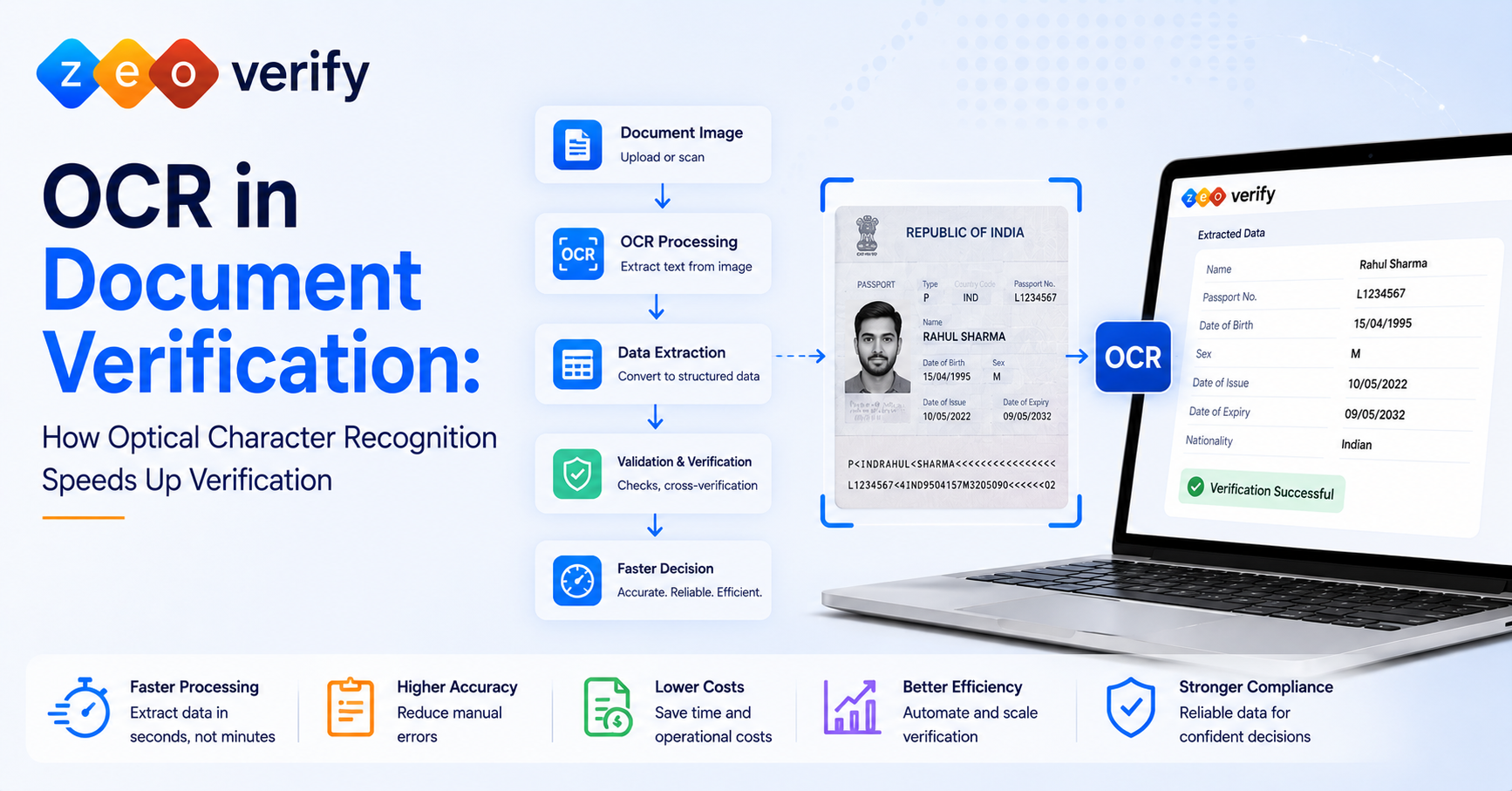
The general pipeline moves from a raw image to structured, usable data in a few steps. It starts with document or image input, since OCR can work from scanned documents, PDFs, photos and mobile phone captures. Before recognition begins, image preprocessing cleans things up: orientation gets corrected, noise gets reduced, contrast gets adjusted, and the image gets cropped to focus on what matters. Text recognition then identifies characters, words and text regions, generally handling printed text well, with quality varying by language and font depending on the OCR engine. Once recognized, data extraction turns that text into usable machine-readable data, with relevant fields identified and manual transcription needs dropping significantly.
The end result is structured information that looks something like this:
| Document Field | Extracted Information |
|---|---|
| Name | John Smith |
| Date of Birth | 15/04/2000 |
| Document Number | XXXXX |
| Institution | Example University |
It is worth being clear here: extraction is not the same thing as validation. OCR tells you what is written on the document. It does not tell you whether that information is accurate or genuine.
What Role Does OCR Play in Document Verification?
OCR provides the machine-readable information that document verification systems then use for validation, cross-checking, risk assessment and workflow decisions. OCR itself primarily answers “what information is on this document?” while verification asks “can this document and its information be trusted?”
Document Image → OCR → Extracted Data → Field Validation → Cross-Checks → Fraud/Anomaly Signals → Verification Decision → Human Review if Required
OCR’s actual contribution includes making document information searchable, converting unstructured visual information into structured fields, enabling automated validation and cross-document comparisons, feeding information into downstream workflows, and cutting down on manual transcription.
| OCR | Document Verification | |
|---|---|---|
| Purpose | Extracts text and data | Evaluates document information and characteristics |
| Output | Machine-readable information | A verification outcome or workflow signal |
| Focus | Recognition | Validation and trust |
| Scope | Can support verification | Performs the broader verification checks |
How Does OCR Speed Up Document Verification?
OCR speeds up document verification by automating data extraction, reducing manual transcription, and making information immediately available for downstream validation and verification workflows.
Instead of a person reading and manually transcribing every field, OCR extracts the information automatically and moves it straight into the next step of processing. This directly cuts down on typing, copying, repeated reading and manual form filling, all of which were previously the slowest and most error prone part of the process. The old path looked like manual reading, then manual entry, then manual validation. The new path looks like capture, then OCR, then structured data, then automated checks, cutting out several slow manual steps entirely.
OCR also reduces the errors that come from manual transcription, though it is worth being honest that OCR itself can make recognition errors too, which is exactly why quality controls and confidence thresholds matter. And because extraction no longer depends on someone manually typing every field, organizations can process a much larger volume of documents without a matching increase in staff.
What Information Can OCR Extract From Documents?
OCR can extract many types of text based document information, though the exact fields depend on document type, image quality, language, layout and the specific OCR system being used.
| Information | Example | Why It Matters for Verification |
|---|---|---|
| Name | Student name | Compared against application records |
| Date of birth | DD/MM/YYYY | Cross-checked against identity information |
| Document number | Certificate or ID number | Supports validation |
| Institution | University name | Supports source checks |
| Issue date | Date issued | Checked against document information |
| Expiry date | Date of expiry | Determines current validity |
| Course or program | Degree or course | Compared against submitted details |
| Address | Residential address | Supports identity and data checks |
One important note here: OCR extracts the field, but it does not independently establish whether that field is genuine.
OCR vs Manual Document Data Entry
OCR automates the reading and extraction of document information, while manual data entry requires people to read and type the information themselves. OCR can improve processing speed and scalability, but human review remains important for exceptions and low confidence results.
| Factor | OCR | Manual Data Entry |
|---|---|---|
| Speed | Automated extraction | Human dependent |
| Human effort | Lower | Higher |
| Scalability | Higher | Limited by staff capacity |
| Consistency | System dependent | Can vary between reviewers |
| Errors | Recognition errors possible | Transcription or typing errors possible |
| Processing volume | Better suited to high volume | More resource intensive |
| Best use | Repetitive extraction | Complex or ambiguous cases |
Can OCR Detect Fake or Tampered Documents?
OCR alone does not establish whether a document is authentic or detect every type of fraud. It can extract information that supports downstream validation and fraud detection checks, while other technologies assess document characteristics, consistency, source data or anomalies. OCR identifies text, fields, dates, numbers and names. Additional verification, separate from OCR, evaluates document structure, visual characteristics, field consistency, source records, security features where supported, and anomaly signals from AI.
A simple example makes the distinction clear: OCR extracts a certificate number from a document. A separate verification system then checks whether that number and related information can actually be validated against an appropriate source. OCR did the reading. Verification did the checking. For a deeper look at how AI contributes to this fraud detection layer, see our guide on AI in document verification.
OCR Limitations in Document Verification
OCR performance can be affected by document quality, layout, language, handwriting, image conditions and character similarity. Organizations should treat extracted data as input to a verification workflow rather than assuming every OCR result is correct or authentic. Common issues include blurry images, poor lighting, skewed documents, cropped content, complex layouts, tables, handwriting, multiple languages, unusual fonts, and characters that look similar to each other and get misread.
Human review remains appropriate when OCR confidence is low, document quality is poor, the format is unusual, the case is high risk, or extracted information conflicts with other records. It is worth repeating clearly: better OCR accuracy does not automatically establish document authenticity. Those are two different things entirely.
OCR for Academic and Student Documents
OCR can convert information from academic certificates, transcripts, admission documents and other student records into structured data that supports downstream verification and administrative workflows. Academic certificates typically yield student name, institution, qualification, course, date and certificate number where available. Transcripts often include student information, institution, subjects, grades, credits and program information, while other commonly processed documents include admission letters, enrollment records and identity documents.
As with any document type, OCR extracts this information. It does not independently authenticate an academic document, which is why layered verification still matters even for something as routine looking as a transcript.
How OCR Works With AI and Document Verification Software
OCR extracts document information, while AI and other verification technologies analyze patterns, inconsistencies and risk signals. Automation then connects these capabilities into a workflow that can route documents for approval, rejection or human review.
| Technology | Primary Role | Example Output |
|---|---|---|
| OCR | Extract information | Name, date, number |
| AI/ML | Analyze patterns | Anomaly or risk signal |
| Computer vision | Analyze visual characteristics | Visual inconsistency |
| Data validation | Check information | Match or mismatch |
| Automation | Move workflow forward | Review or approve route |
The relationship is straightforward once broken down: OCR extracts, AI analyzes, validation checks, automation routes, and verification software coordinates the whole workflow together.
Benefits of OCR-Powered Document Verification
OCR-powered verification workflows can reduce repetitive data entry, accelerate information extraction, increase processing capacity, and make document data available sooner for validation and review, with gains showing up mainly in faster processing, less manual entry, greater capacity and cleaner structured data. For a fuller breakdown of what automation brings to document verification overall, see our piece on the top benefits of document verification software.
How to Choose OCR-Based Document Verification Software
Organizations should evaluate OCR as one component of the complete verification workflow, considering extraction quality, supported documents, integrations, validation capabilities, fraud detection, security, scalability, reporting and human review processes. Worth checking during evaluation: extraction quality, supported document types, language support, structured data output, AI capabilities, validation and fraud detection capabilities, human review workflows, API and integration options, security and data privacy, scalability, and reporting.
Avoid choosing a solution simply because it advertises “AI OCR.” The stronger question to ask any vendor is what actually happens after the text gets extracted. That answer tells you a lot more about the real product than the extraction claim alone.
How ZeoVerify Uses Automated Document Verification
ZeoVerify approaches this as a broader workflow rather than treating OCR as a standalone feature, supporting academic, financial and KYC document verification, along with real-time validation against original issuing authorities and DigiLocker-based document access with user consent.
Manual document handling leads to repetitive processing, delays and a growing administrative workload. The alternative is digital document retrieval and processing, verification against appropriate sources, a structured workflow, and faster overall decisions. See how ZeoVerify can help streamline digital document verification and reduce reliance on manual review.
Key Takeaways
OCR converts document images into machine-readable information, which makes structured document data available faster and supports downstream validation and verification. It reduces manual transcription work considerably, but it does not independently prove document authenticity on its own. AI, validation, source checks and other technologies add the additional signals that a complete verification process actually needs, and human review remains genuinely useful for ambiguous or high risk cases. When evaluating a solution, look at the entire verification workflow rather than judging a platform on OCR alone.
Frequently Asked Questions
What is OCR document verification? It refers to using optical character recognition to extract machine-readable data from documents as part of a broader verification workflow.
How does OCR speed up document verification? By automating data extraction and reducing manual transcription, which lets downstream validation and verification checks happen much faster.
Can OCR verify documents? Not on its own. OCR extracts information, while separate validation and verification steps determine whether that information can be trusted.
Can OCR detect fake documents? OCR itself does not detect fraud. It provides extracted data that other verification layers, including AI and validation checks, can use to flag potential issues.
What are the limitations of OCR? Poor image quality, unusual layouts, handwriting, multiple languages and similar looking characters can all reduce OCR accuracy.
What should I look for in OCR document verification software? Look past the extraction claim itself and check what happens next: validation, fraud detection, human review workflows, integrations and security.